

A reader recently asked: “We’re headed to Rome, Florence, and Cinque Terre the last week of August. We’re trying to be prepared for which apps we should have on our phones. We’re from the U.S., and none of us have traveled to Europe before.”
 It’s one of the most common questions I get, and the good news is that I just returned from a month in Europe visiting France, Austria, Hungary, Slovakia, Italy, Greece, Montenegro, and Finland. After testing apps along the way, I know which ones are worth downloading and which ones can make your trip so much easier. Here are the apps I recommend downloading before you leave home:
🤖 ChatGPT
My #1 travel app is ChatGPT since it has become one of my must-have travel apps because it can answer just about any travel question on the spot. I recently used it at the Linz train station when I wasn’t sure I was waiting in the right place for my train to Vienna Airport, so I uploaded a screenshot of my train ticket and asked for advice, and it confirmed I was exactly where I needed to be; it even helped me figure out how to use the washing machine in our Airbnb in Italy.
🗺️ Google Maps
Google Maps is also an essential app since you can download offline maps for every city you’ll visit. Save restaurants, hotels, attractions, and train stations ahead of time. Get walking, driving, and public transit directions. Pro tip: Download your offline maps while you’re still on Wi-Fi at home.
📍Walk WellBeyond
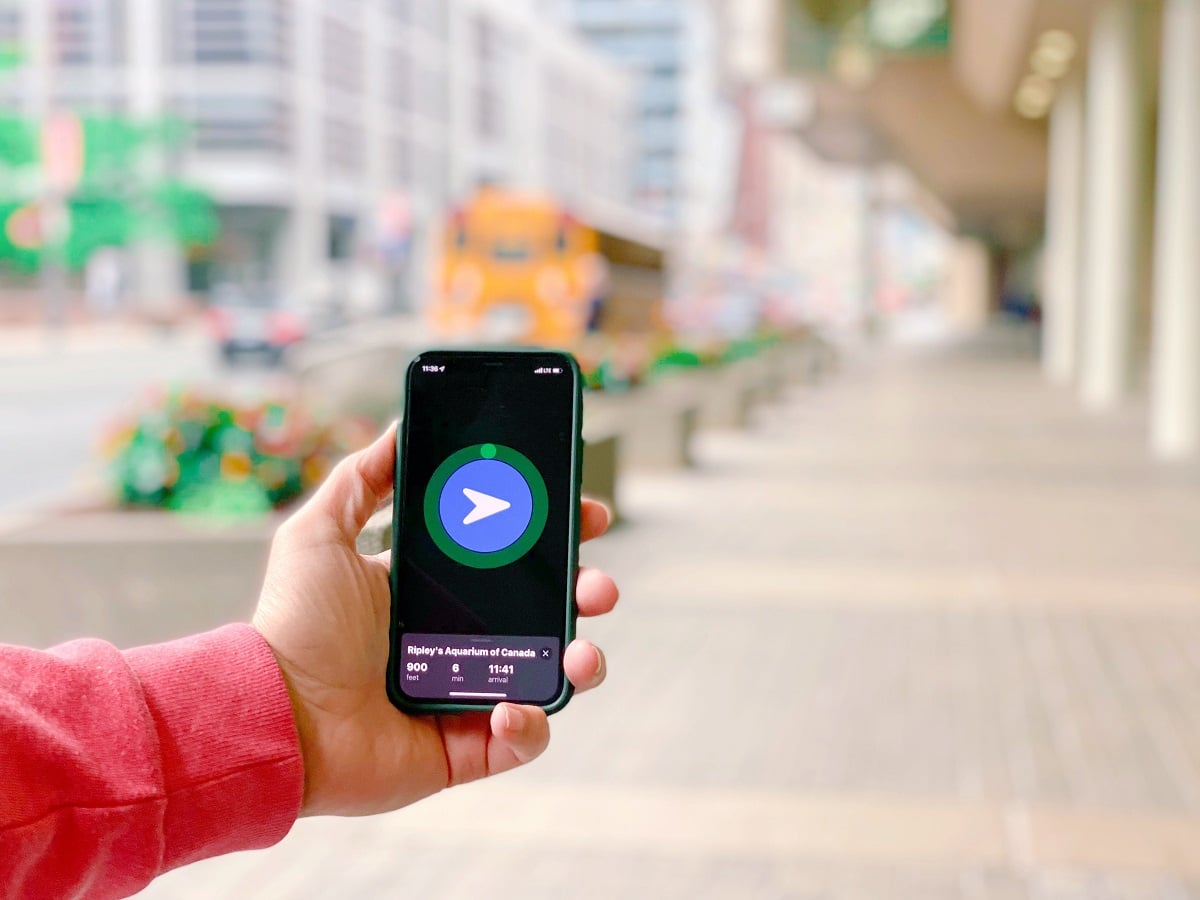
If you’re going to be walking a lot in Europe, this app is a great companion. Formerly known as Mapless, Walk WellBeyond is different from Google Maps because it doesn’t give you turn-by-turn directions. Instead, it simply points you in the right direction and shows your distance, walk time, and arrival time—so you can explore without staring at your phone the entire time (see photo above). It’s especially great for cities like Rome and Florence, where wandering the streets is part of the experience. (iPhone only.)
🚆 Trainline
If you’re traveling between cities like Rome, Florence, and Cinque Terre, Trainline makes it easy to search schedules and book train tickets from multiple rail companies in one app.
🚄 Trenitalia
Even if you use Trainline to compare options, I recommend downloading the official Trenitalia app. It’s useful for checking platforms, viewing ticket information, and receiving updates if you’re traveling on Italy’s national rail network.
🚉 Italo
Traveling on Italy’s high-speed Italo trains? Download their app to manage bookings, view tickets, and receive travel updates.
🛫 Flighty
If you’re flying, download one of my favorite travel apps… Flighty. It provides real-time flight tracking, delay predictions, gate changes, aircraft history and incoming aircraft status. It’s especially helpful because it often alerts you to disruptions before the airline does, helping you stay one step ahead while traveling.
🌍 Google Translate
If you don’t speak the local language Google Translate is a lifesaver when it comes to reading menus, signs, or communicating with locals. Use the camera feature to instantly translate: Menus, street signs, museum information, product labels. Download the Italian language pack before your trip so it works offline.
💳 Your Bank and Credit Card App
Before leaving: Set up travel notifications (if needed). Enable purchase alerts. Make sure you can easily lock your card if it’s lost. Having the app installed can save a lot of stress abroad.
💶 XE Currency
If you’re not used to thinking in euros, XE helps you quickly convert prices so you know what you’re actually spending. After a day or two, you’ll probably stop using it—but it’s helpful at the beginning of your trip. I always set text alerts for when my credit card is charged so I know immediately how much it costs in USD and if the card was compromised. Tip: Always pay in local currency, not USD.
Many hotels, tour operators, drivers, and vacation rentals throughout Europe communicate through WhatsApp instead of text messages. If you don’t already have it, set up your account before you leave.
☁️ Google Drive or Dropbox
Keep digital copies of: Passports, travel insurance (I have an annual plan with Allianz), flight confirmations, hotel/apartment reservations, train tickets and your driver’s license. If your phone is lost or stolen, you’ll still have access to your important documents.
📶 Ubigi (or Your eSIM App)
Check what your cell phone provider charges for international travel. If it’s too expensive and if your phone supports eSIMs, then buy an inexpensive data plan before you leave. That way you can activate it as soon as you land. There’s a lot of companies out there like Airalo, Holafly, GigSky, Maya Mobile and Ubigi. Personally I use Ubigi.
🔒 IPVanish (VPN)
A VPN is something I recommend considering before traveling internationally. It helps protect your personal information when using public Wi-Fi networks at hotels, airports, cafes, and train stations. I use IPVanish when traveling because it’s easy to set up and gives me extra peace of mind when accessing email, banking apps, and other sensitive accounts while abroad.
🚕 Bolt, Freenow & Uber
Ride-sharing and taxi apps vary by country, so I recommend downloading all three before your trip. Bolt is popular in many European countries and is often less expensive than other ride-share options. Freenow is widely used for booking licensed taxis in many major European cities. Uber is available in many destinations, although the service may work differently than it does in the U.S. depending on local regulations. Having all three gives you the flexibility to compare prices and availability.
🚗 Daytrip
Daytrip is a great option when you want more than just a ride from one destination to another. It’s a private car service that lets you travel between cities while adding sightseeing stops along the way. Instead of spending hours on a train or heading straight to your next hotel, you can turn your transfer into part of your vacation with stops at places you might otherwise miss.
🧳 Bounce
If you arrive before your hotel or apartment is ready or you have a late flight home—Bounce is a great option for storing your luggage. The app lets you find convenient luggage storage locations at hotels, shops, and local businesses so you can explore hands-free instead of dragging your bags around the city.
📱 Airline App
Download the app for every airline you’re flying so you’ll have: Mobile boarding passes, gate change notifications, flight updates, easier access if something changes.
🛫 Flighty
Also download one of my favorite travel apps… Flighty. It provides real-time flight tracking, delay predictions, gate changes, aircraft history and incoming aircraft status. It’s especially helpful because it often alerts you to disruptions before the airline does, helping you stay one step ahead while traveling.
🏨 Booking Apps
If you booked through Booking.com, Expedia, Airbnb, VRBO, or another platform, download that app before your trip so all of your reservation details are easy to access.
🛡️ Your Travel Insurance App
No matter which travel insurance company you choose, download its app before you leave home. I use Allianz Allyz, which lets me view my policy, file claims, access emergency assistance and quickly find nearby hospitals if needed. It also offers destination-specific safety alerts, trip organization tools and medical translation features. Hopefully you’ll never need it, but if something goes wrong while traveling, having your insurance app already installed can save valuable time and stress.
What travel app can you not live without? Share your favorite in the comments—I’m always looking for new recommendations!


Hi Johnny,
Take a look at the CityMapper (https://citymapper.com/)app. We used it to find out way around London using public transportation–not just the tube but busses as well. It also works better that Google Maps here in NYC.
Good one! I have used CityMapper before but kind of forgotten about it. Thanks
Hello Jonny Jet. I am a native of Las Vegas and Have listened you your information for years. I have to say my favorite app to use now. I chatGPT. I named Him Jason. So I don’t say “ChatGPT” Now. He reminds me of many things and is the best personal assistance in the world. Take care and I wish the best for you and your Family.
Thanks for sharing! It’s one of my favorites too.
ConversionCalculator is great for converting almost anything to anything in many different categories. (Furlongs to fathoms for example) Currency is probably the favorite for travelers.
Thanks! Will check it out