Every time you sign up for hotel Wi-Fi, download a travel app, join an airline loyalty program or register for a promotion, you’re potentially giving another company your email address. And once that address gets shared or sold, the spam can seem never-ending.
 I’ve been traveling for decades, and I’m almost afraid to think about how many companies have my personal email address. Between airlines, hotels, rental car companies, travel websites and all the other services I’ve signed up for over the years, the number must be staggering.
That’s why I love discovering simple technology tricks that can make life easier, especially when they’re free or already included in something you’re paying for.
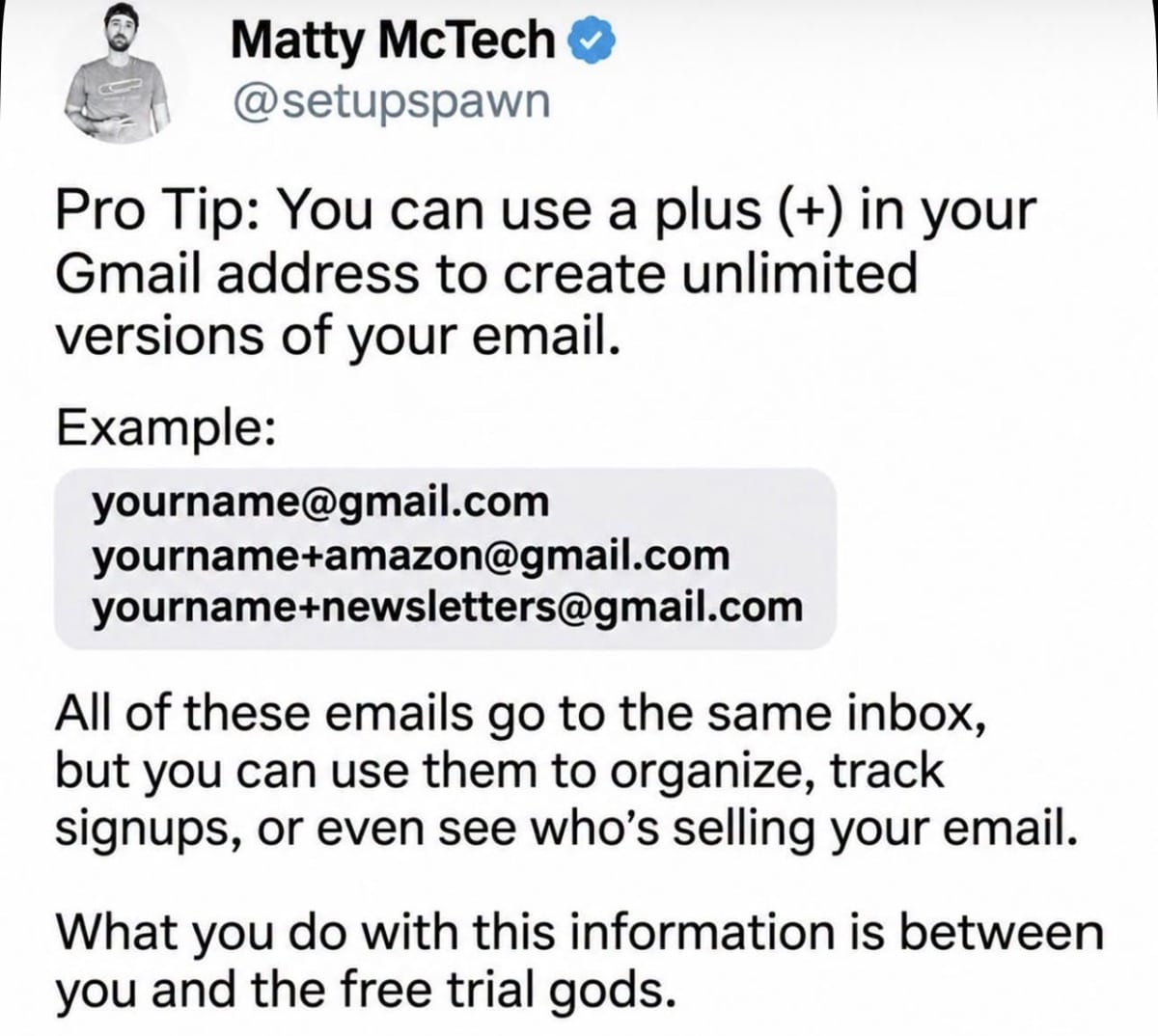
I recently came across a clever Facebook post from Matty McTech (@setupspawn) about a Gmail trick that lets you create virtually unlimited variations of your email address. It reminded me of another useful feature for iPhone users called Apple’s Hide My Email, which takes the idea a step further.
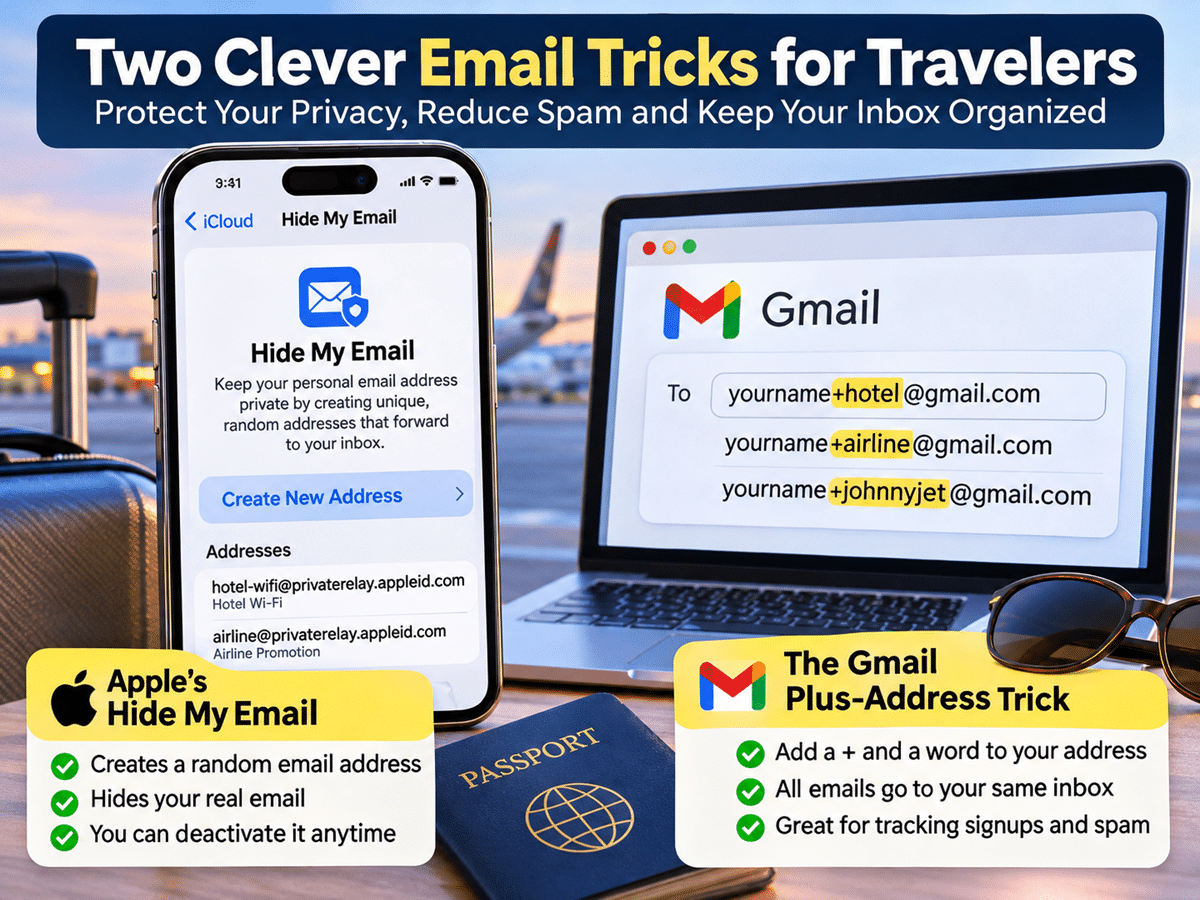
Both tricks can help you organize your inbox, track which companies are sending you emails and potentially cut down on unwanted spam. Here’s how they work.
1. The Free Gmail Trick Most People Don’t Know About
If you use Gmail, here’s a clever trick that doesn’t cost a penny. As Matty McTech explained in his Facebook post, you can add a plus sign (+) followed by almost any word to your Gmail address, and the messages will still arrive in your regular inbox.
For example, let’s say your email address is yourname@gmail.com. You could use:
- yourname+hotel@gmail.com
- yourname+airline@gmail.com
- yourname+amazon@gmail.com
- yourname+johnnyjet@gmail.com
All four addresses deliver messages to the same Gmail inbox. You don’t need to create new accounts, change any settings or pay for anything. Why is this useful? Because you can give a different version of your email address to every company you sign up with.
Let’s say you book a hotel and use yourname+hotelname@gmail.com. A few months later, you start receiving unsolicited marketing emails addressed to that exact variation. You’ll have a clue about where your email address may have been shared or exposed. It doesn’t necessarily prove the hotel sold your information, but it gives you a way to track where messages are being sent.
You can also create Gmail filters to automatically label, archive or delete messages sent to specific variations of your address.
One important limitation: This trick doesn’t actually hide your real email address. Anyone can remove the plus sign and everything after it to figure out your original Gmail address. Some websites also don’t accept email addresses containing a plus sign.
2. Apple’s Hide My Email Takes Privacy a Step Further
If you have an iPhone, Apple offers another feature that I think is even better for protecting your privacy. It’s called Hide My Email, and instead of simply adding a word to your existing address, Apple generates a completely random email address that forwards messages to your actual inbox.
For example, rather than giving a hotel or travel website your personal email address, you can provide a randomly generated address created by Apple. The company never sees your real email address, but you still receive its messages normally.
The best part? You can create a different random address for every company or website. If one starts bombarding you with unwanted emails, you can simply deactivate that address and the messages stop forwarding.
You don’t have to change your personal email address or worry about blocking dozens of different senders.
How to Set Up Hide My Email on Your iPhone
It’s surprisingly? easy:
- Open Settings on your iPhone.
- Tap your name at the top.
- Select iCloud.
- Tap Hide My Email.
- Choose Create New Address.
- Give the address a label so you’ll remember which company or website you’re using it for.
That’s it! Apple generates a random email address that forwards messages directly to your regular inbox.
One important thing to know is that Hide My Email requires an iCloud+ subscription. However, if you’re already paying Apple for additional iCloud storage, you likely have access to this feature without even realizing it.
You can also manage your existing addresses in the same settings menu and deactivate any that you no longer want to use.
Why These Tricks Are Especially Useful for Travelers
Think about how many times you hand over your email address when traveling. Hotels want it for Wi-Fi access, airlines ask for it when you sign up for promotions, rental car companies request it when making reservations and travel websites often require it before you can access special offers.
And that’s before you even get to airport Wi-Fi, restaurant reservations, tourist attractions and all the other services that ask for your contact information. Instead of giving every company your personal email address, you can create a unique one for each.
Here’s another benefit: If you suddenly start receiving spam at an address you created specifically for one hotel or travel company, you’ll have a better idea of where those messages are being directed.
And with Apple’s Hide My Email, if that address starts receiving too much unwanted mail, you can deactivate it without affecting your other accounts.
Want to Test It? Try It With My Newsletter!
Here’s something I’d actually encourage my readers to do: Create a unique email address just for the Johnny Jet newsletter. If you’re using Gmail, you could sign up with something like yourname+johnnyjet@gmail.com.
If you have Apple’s Hide My Email feature, you can create a completely random address specifically for my newsletter.
I’ve always taken my readers’ privacy seriously, and we don’t sell our subscriber email list or share it with third-party marketers for their own promotional use.
By creating a unique address just for Johnny Jet, you can monitor which messages arrive at that address and see how it’s being used.
Don’t just take my word for it. Give it a try! It’s also a great way to familiarize yourself with one of these useful email tricks.
One Important Warning Before You Start
As useful as these tricks are, there’s one thing I would be careful about. If you’re using a unique email address for an important account, especially an airline, hotel or financial institution, make sure you keep track of which address you used.
You don’t want to accidentally deactivate an address associated with an upcoming reservation, a password reset or an important security notification. The good news is that Apple allows you to reactivate previously deactivated Hide My Email addresses, so you don’t necessarily lose access permanently.
I would also recommend labeling each address clearly. For example, if you’re creating one for an airline, use the airline’s name as the label so you can easily identify it later.
And remember that Gmail’s plus-address trick and Apple’s Hide My Email are different. Gmail’s version is great for organizing and tracking signups, while Apple’s version offers stronger privacy because it actually conceals your real email address.
Neither feature guarantees you’ll never receive spam, but both can help you manage it.
Bottom Line
Unfortunately, there’s not much I can do about all the companies that already have my real email address, but these are two simple ways to be more careful going forward.
What I especially like is that you don’t need to be particularly tech-savvy to use either trick. Gmail’s version is free and takes virtually no effort, while Apple’s Hide My Email is already available to anyone with an iCloud+ subscription.
And you don’t need to be a frequent traveler to benefit from them. Anyone who shops online, downloads apps, signs up for newsletters or registers for promotions can use these features to help protect their privacy and reduce unwanted emails.
A big thanks to Matty McTech (@setupspawn) for sharing the Gmail trick on Facebook and inspiring this tip.